

The best ChatGPT prompts for social media posts tell ChatGPT four things: who you are, where the post will go, who you’re writing for, and what you want them to do. Leave those out and you get the same bland caption everyone else is posting.
Below are 30 copy-paste prompts for Instagram, Facebook, LinkedIn, X, TikTok, Reels and Pinterest, plus five follow-up prompts that fix a weak first draft. They also work in Gemini and Claude.
How to Write a ChatGPT Prompt for Social Media Posts
A good social media prompt has five parts: who you are, where the post will be published, who will read it, what you want them to do, and how it should sound. Add a length limit and anything you want to avoid, and ChatGPT has enough to work with.
The 5-part prompt formula
| Part | What to tell ChatGPT | Example |
| Who you are | Your business or role | I run a small coffee shop in Austin |
| Platform | Where the post will live | |
| Audience | Who will read it | Remote workers who stop in on weekday mornings |
| Goal | What you want them to do | Try a new drink this Saturday |
| Tone and limits | Voice, length, things to avoid | Warm and a little funny, under 60 words, no hashtags |
Here’s the fill-in version you can reuse for almost any post:
Prompt:
Weak prompt vs strong prompt
Here’s the same request written two ways. (Maple Street Coffee is a made-up example business.)
Weak prompt: Write an Instagram post for my coffee shop.
Strong prompt: I run Maple Street Coffee, a small coffee shop in Austin, Texas. Write an Instagram caption announcing our new brown-sugar oat latte for remote workers who stop in on weekday mornings. Goal: get them to try it this Saturday. Tone: warm and a little funny, no corporate language. Under 60 words, one emoji at most, no hashtags.
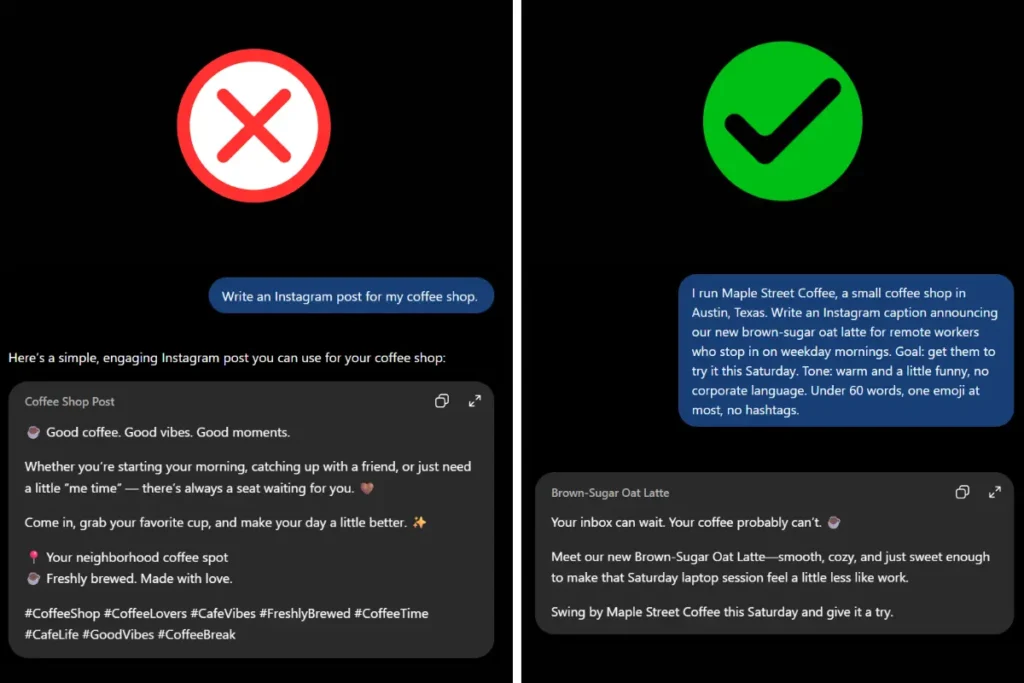
The weak prompt leaves ChatGPT guessing, so it falls back on generic wording that could belong to any café. The strong prompt gives it a place, an audience, a goal and a voice, so the result needs a light edit instead of a rewrite.
Even a strong prompt can’t know the things only you know. Before you publish anything, add one detail from real life: a customer’s first name (with permission), the actual price, the weather that morning, what went wrong last week. That single detail is what makes a post sound like a person wrote it.
ChatGPT Prompts for Social Media Posts Ideas
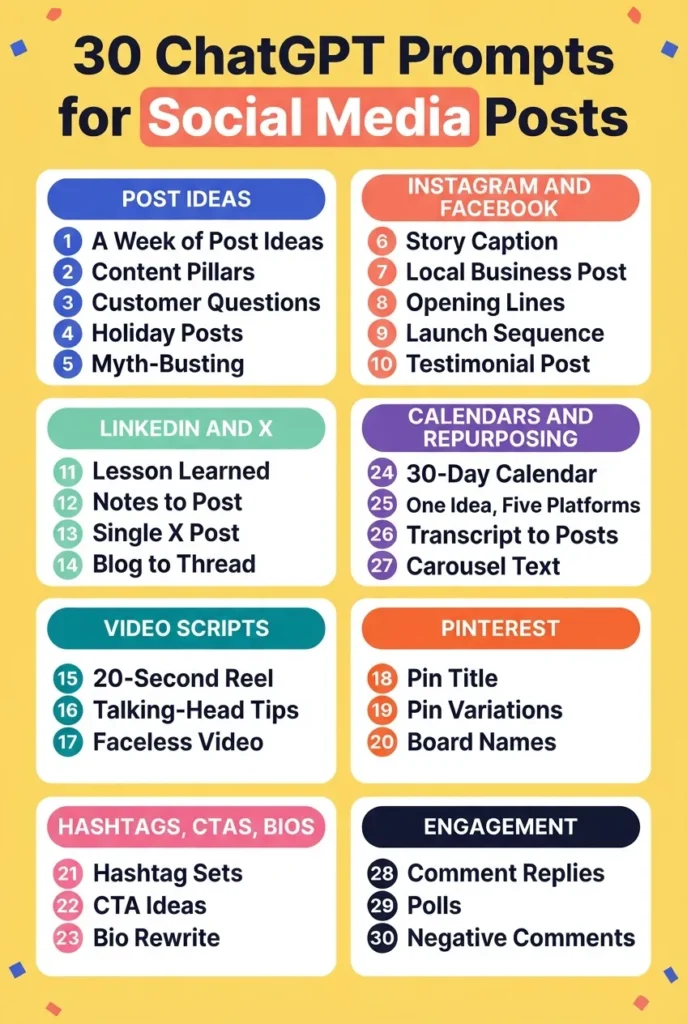
Start here if you stare at a blank screen every Monday. These prompts give you topics before you write a single caption.
1. A week of post ideas
Best for: planning one platform at a time.
Prompt:
Why it works: Asking for a format and a goal per idea stops you from getting a list of vague topics.
2. Content pillars
Best for: building a repeatable system instead of starting from scratch each time.
Prompt:
Why it works: Pillars turn “what should I post?” into “which pillar is due?”
3. Posts from customer questions
Best for: helpful posts that come from real demand.
Prompt:
Why it works: Real questions use the words your customers actually type and say.
4. US holiday and seasonal posts
Best for: timely posts that don’t feel forced.
Prompt:
Why it works: The “skip any that feel forced” line filters out the weak ties ChatGPT would otherwise include.
5. Myth-busting series
Best for: showing expertise and starting conversations.
Prompt:
Why it works: The “real experience” limit keeps ChatGPT from inventing myths you can’t speak to.
ChatGPT Prompts for Instagram and Facebook Captions
Captions are where generic AI wording shows up fastest, so these prompts push for structure and specifics.
6. Story-style Instagram caption
Best for: posts that need to stop the scroll.
Prompt:
Why it works: A story shape gives the caption a beginning, a turn and an ending, which reads more naturally than a list of facts.
If your caption goes with an AI-edited image, see our ChatGPT photo editing prompts for Instagram.
7. Facebook post for a local business
Best for: neighborhood shops, restaurants and service businesses.
Prompt:
Why it works: Asking for two tones lets you pick the one that sounds like you.
8. Ten opening lines
Best for: fixing weak first lines on any platform.
Prompt:
Why it works: Naming the styles gives you real variety instead of ten versions of the same line.
9. Launch sequence
Best for: new products, services or events.
Prompt:
Why it works: Four posts with four different jobs stop your launch from repeating itself.
10. Testimonial into a post
Best for: social proof without bragging.
Prompt:
Why it works: The “do not add claims” line keeps ChatGPT from inflating the review.
ChatGPT Prompts for LinkedIn and X Posts
LinkedIn and X reward a clear point of view and short, direct writing.
11. LinkedIn post from a lesson learned
Best for: professionals sharing experience.
Prompt:
Why it works: Giving ChatGPT your real example means the post is built on something true instead of a made-up story.
If you’re refreshing your profile photo, try our LinkedIn profile picture prompt for ChatGPT and Gemini.
12. LinkedIn post from rough notes
Best for: people who have ideas but hate writing.
Prompt:
Why it works: ChatGPT organizes your thinking instead of replacing it, so the post keeps your voice.
13. Single X or Threads post
Best for: quick, sharp posts.
Prompt:
Why it works: Five different styles show you which voice fits before you commit.
14. Blog post to X thread
Best for: getting more use out of articles you’ve already written.
Prompt:
Why it works: Standalone points mean each post can be shared on its own.
If you write blog posts for search, our ChatGPT prompts for SEO may help too.
ChatGPT Prompts for TikTok and Reels Scripts
Video scripts need to sound spoken, not written. These prompts say so directly.
15. 20-second Reel or TikTok script
Best for: short, punchy videos.
Prompt:
Why it works: “Spoken words” pushes ChatGPT away from formal sentences.
16. “3 mistakes” talking-head script
Best for: creators who talk to camera.
Prompt:
Why it works: Leading with the most surprising mistake gives people a reason to keep watching.
17. Faceless video script
Best for: people who don’t want to be on camera.
Prompt:
Why it works: Scene-by-scene structure gives you a shot list, not just a script.
ChatGPT Prompts for Pinterest Pins
Pinterest works more like a search engine than a feed, so the words in your titles and descriptions matter.
18. Pin title and description
Best for: driving search traffic to a blog post or product.
Prompt:
Why it works: Giving ChatGPT the real search phrases keeps the wording natural and searchable.
19. Five pin variations for one article
Best for: getting more reach from a single post.
Prompt:
Why it works: Different angles let you test what people respond to.
20. Board names and descriptions
Best for: organizing a new Pinterest account.
Prompt:
Why it works: Searchable names help boards show up in results.
Prompts for Hashtags, CTAs and Bios
21. Tiered hashtag set
Best for: a balanced mix of broad and specific tags.
Prompt:
Why it works: Mixing sizes gives you both reach and a chance to be seen.
22. CTA variations
Best for: avoiding pushy calls to action.
Prompt:
Why it works: Naming the phrases to avoid removes the clichés.
23. Bio rewrite
Best for: profiles that don’t say what you do.
Prompt:
Why it works: Three angles show you what to emphasize.
Prompts for Content Calendars and Repurposing
These help with the bigger picture of content creation: planning a month and squeezing more out of what you’ve already made.
24. 30-day content calendar
Best for: planning a full month in one sitting.
Prompt:
Why it works: The table format and open days make a calendar you can actually follow.
25. One idea, five platforms
Best for: covering every platform without writing five times.
Prompt:
Why it works: “Not the same text pasted five times” forces genuinely different versions.
26. Transcript into posts
Best for: videos, podcasts and talks.
Prompt:
Why it works: Using your own words keeps the voice yours, and the source note lets you verify.
27. Carousel slide text
Best for: Instagram and LinkedIn carousels.
Prompt:
Why it works: Word limits per slide keep the design readable.
Prompts for Replying to Comments and Growing Engagement
28. Reply templates for common comments
Best for: answering quickly without sounding cold.
Prompt:
Why it works: Templates save time while still sounding human.
29. Poll and question posts
Best for: getting real answers from followers.
Prompt:
Why it works: The follow-up post gives you two posts from one idea.
30. Handling a negative comment
Best for: staying calm in public.
Prompt:
Why it works: Giving the facts stops ChatGPT from guessing and apologizing for things that didn’t happen.
FAQs
Q1. Do these prompts work in Gemini or Claude?
Yes. The structure works in any AI chatbot. The wording of the results will differ, so run the prompt and adjust with the follow-up prompts. Gemini and Claude may format tables and lists a little differently.
Q2. How do I write a good ChatGPT prompt for social media?
Use five parts: who you are, where the post will go, who it’s for, what you want people to do, and how it should sound. Add a length limit and anything to avoid. Then add one real detail, like a name or a number, before you post it.
Q3. Can I use ChatGPT for social media posts for free?
Yes, the prompts in this article work in the free version of ChatGPT. Free plans have usage limits and may use different models than paid plans, and those details change, so check your current plan in ChatGPT’s settings. For short posts, a clear prompt matters a lot.
Q4. Can ChatGPT make a social media content calendar?
Yes. Prompt 24 builds a 30-day calendar as a table with pillars, formats, hooks and calls to action. ChatGPT doesn’t know your real schedule, stock or events, so check the dates and swap in what’s actually happening in your business.
Q5. How do I stop ChatGPT posts from sounding robotic?
Change the first line, add one detail only you know, cut filler phrases and read the post out loud. Starting from your own notes, as in prompt 12, also keeps more of your voice. Our guide to making ChatGPT write like a human goes deeper.